 CAM 01REC12:39 AM
Choo Choo Charles
Choo Choo Charles
Click to load the game
POWER ON... LOADING
Taking a while. Try Reload if nothing appears.
Tip: on a phone, rotate to landscape or tap Fullscreen for the best view.
Unofficial fan version Unofficial fan made browser version. Not affiliated with Scott Cawthon or Steel Wool Studios.
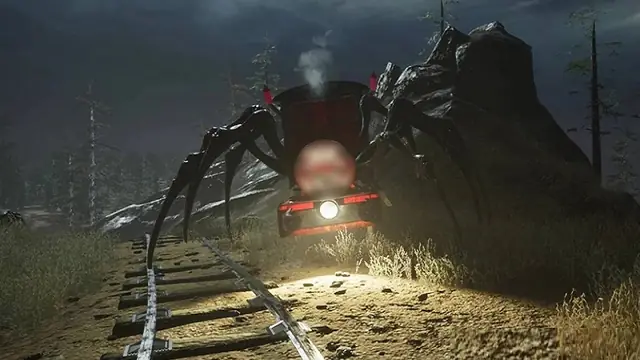
Choo Choo Charles on Playhop is an unofficial fan-made browser action-horror shooter where you steer and upgrade a train across eerie landscapes, switch track directions in time, and enter shooting mode to fend off Spider Charles.
| Playhop Title | Choo Choo Charles |
|---|---|
| Playhop Developer | Play Here |
| Inspired By | Choo-Choo Charles (Two Star Games, 2022) |
| Browser Version | Unofficial fan-made version on Playhop |
| Genre | Action horror / train shooter |
| Main Threat | Spider Charles |
| Core Mechanics | Train steering, direction switching, upgrades, turret shooting mode |
| Aiming Note | Inverted turret joystick (move down to aim up, move up to aim down) |
| Objective | Complete missions, upgrade your train, and outsmart Spider Charles |
| Controls | On-screen train & shooting controls (PC Mouse / Mobile Touch) |
About
Choo Choo Charles blends survival horror with fast-paced arcade shooting on Playhop. Instead of hiding on foot inside a single dark room, you captain an armored train rolling across eerie landscapes while being hunted by Spider Charles, a monstrous, multi-legged locomotive creature that refuses to stay behind.
Every run balances driving focus with combat reflexes. You need to enhance your train, complete tough missions, flip track directions cleanly, and jump onto your mounted gun the second Charles appears down the line.
How to Play
Winning depends on juggling three key tasks as you travel down the tracks:
- Steer and Switch Directions: Keep your train moving smoothly and change track direction on time whenever junctions or threats appear ahead.
- Upgrade Your Ride: Gather mission rewards and enhance your train so it can endure heavier chases and deliver stronger firepower against Charles.
- Switch to Shooting Mode: When Spider Charles charges in, toggle into shooting mode immediately and fire back to force him to retreat.
- Master Inverted Aiming: Remember the turret control rule: pull the aiming joystick down to aim higher, and push it up to aim lower.
Controls
Choo Choo Charles uses intuitive on-screen driving and turret controls suited for both mouse clicks and touchscreens.
| Action | PC Controls | Mobile / Touch |
|---|---|---|
| Change train direction / speed | Click on-screen train controls | Tap on-screen train controls |
| Switch to shooting mode | Click Shooting Mode button | Tap Shooting Mode button |
| Aim weapon (inverted Y-axis) | Drag aiming control (down = up, up = down) | Move joystick down to aim up, up to aim down |
| Fire weapon | Click / hold Fire button | Tap / hold Fire button |
Tips to Survive
Practice the Inverted Turret Early
The inverted vertical joystick catches almost every player off guard during their first chase. Spend a couple of seconds testing shooting mode before Charles arrives so pulling down to aim higher feels automatic under pressure.
Switch Back to Driving as Soon as Charles Retreats
Do not stay stuck in shooting mode once Spider Charles breaks off his attack. Return immediately to your train controls so you never miss a track direction change or mission stop.
Upgrade Your Train Whenever Possible
Enhancing your ride pays off across every later mission. Stronger upgrades give you more breathing room when Charles attacks more aggressively.
Keep Listening for Approaching Scuttling
Audio cues often warn you that Spider Charles is closing in before he fills the screen. Switching into shooting mode half a second earlier lets you land opening hits right away.
Stay Calm Under High-Speed Pressure
Balancing train navigation with turret defense is the defining thrill of Choo Choo Charles. Every track decision shapes how smoothly you survive tough missions, so avoid panicking when Spider Charles charges from behind. Keep your eyes on upcoming track switches, toggle cleanly into shooting mode when he closes distance, and let your inverted joystick aim guide steady bursts until he breaks off the chase.
Characters
- Spider Charles: The terrifying spider-legged train monster relentlessly pursuing you across the rails.
- The Conductor (Player): The train operator responsible for navigating tracks, upgrading the locomotive, and fighting back against Charles.
Is This the Official Game?
No. Choo Choo Charles on FNAF Nights is an unofficial fan-made browser version uploaded to Playhop by Play Here. It is not affiliated with, created by, or endorsed by Two Star Games, the developer of the original Choo-Choo Charles.
To play the full open-world Choo-Choo Charles campaign with complete island exploration and quests, purchase the official release by Two Star Games on Steam, PlayStation, Xbox, or Nintendo Switch.
Similar Games
If you like action-packed horror where you can fight back, try these games next:
- Noob vs FNAF: Gather resources, build turrets and fences, and shoot down waves of animatronics.
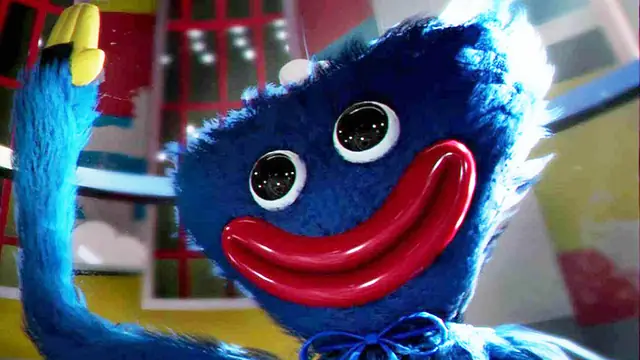
- Poppy Playtime Chapter 1: Use your dual-hand Grab-Pak to solve factory puzzles and outrun Huggy Wuggy.
- Granny: Trade fast train chases for tense, silent stealth inside a trapped house.
How do you fight back against Charles in Choo Choo Charles on Playhop?
While driving your train along the tracks, stay alert for Spider Charles closing in behind you. Switch into shooting mode on time and aim your weapon directly at Charles to push him back before he wrecks your train.
How does aiming work in shooting mode in Choo Choo Charles?
The Playhop build uses inverted vertical aiming on its shooting joystick: move the joystick down to aim upward, and move the joystick up to aim downward. Getting comfortable with that inversion right away makes landing shots during high-speed chases much easier.
What do you do besides shooting Spider Charles?
Alongside fighting off Charles, you pilot your train through atmospheric landscapes, switch train directions at the right moments, tackle challenging missions, and upgrade your train to handle tougher encounters.
Can you play Choo Choo Charles on both desktop and mobile browsers?
Yes. Because the Playhop edition uses on-screen train direction switches and a shooting joystick, it runs directly in both PC and mobile web browsers without downloads.
Why is timing train direction switches important?
Changing train direction on time lets you keep momentum, stay on the right mission route, and avoid letting Spider Charles cut you off when he emerges along the tracks.
Is Choo Choo Charles on Playhop the official game by Two Star Games?
No. This browser version is an unofficial fan-made game uploaded to Playhop by Play Here and is not affiliated with or endorsed by Two Star Games. The official Choo-Choo Charles is available on Steam, PlayStation, Xbox, and Nintendo Switch.
Camera feeds
Related Games
- CAM 01REC12:39 AM
 CAM 02REC01:57 AM
 CAM 03REC04:00 AM