 CAM 01REC12:27 AM
Noob vs FNAF

Noob vs FNAF
Click to load the game
POWER ON... LOADING
Taking a while. Try Reload if nothing appears.
Tip: on a phone, rotate to landscape or tap Fullscreen for the best view.
Unofficial fan version Unofficial fan made browser version. Not affiliated with Scott Cawthon or Steel Wool Studios.
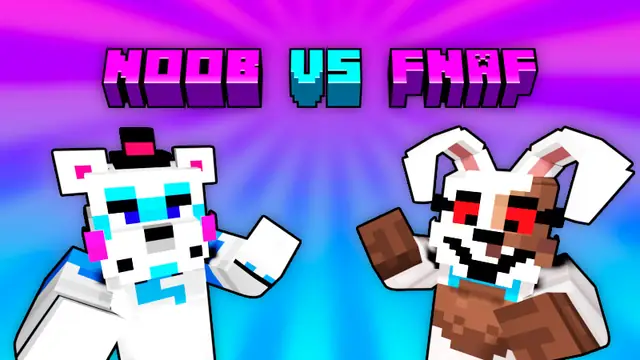
Noob vs FNAF is an unofficial fan-made action shooter and base-defense browser game on Playhop for one or two players, where you gather resources, build turrets, mines, and fences, and hold off endless waves of FNAF animatronics.
| Playhop Title | Noob vs FNAF |
|---|---|
| Inspired By | Five Nights at Freddy's (Scott Cawthon) and blocky sandbox Noob games |
| Playhop Developer | Altata |
| Browser Version | Unofficial fan-made version on Playhop |
| Genre | Action shooter / base-defense wave survival |
| Modes | Single-player and 2-player local co-op |
| Content | 6 locations, 7 animatronic types, 11 weapons, 298 skins, mob editor |
| Defenses | Automatic turrets, mines, fences, and custom structures |
| Controls | Arrow keys + L (P1), WASD + H (P2), or Joystick + Shot button (Mobile) |
About
Noob vs FNAF trades slow security-camera horror for fast-paced, arcade-style survival action on Playhop. Blending blocky “Noob” sandbox charm with relentless waves of Five Nights at Freddy’s animatronics, the game challenges solo players or two friends sharing a keyboard to gather resources, construct a sturdy fort, and blast their way through increasingly intense attacks.
With 6 locations, 7 animatronic enemy types, 11 unlockable weapons, 298 character skins (plus custom skin uploads), and even a hostile mob editor, Noob vs FNAF delivers far more sandbox customization than a typical browser wave shooter.
How to Play
Every match revolves around a crisp gather, build, and defend loop:
- Collect Resources: Roam the map between and during early waves to gather materials needed for upgrades and fortifications.
- Build Your Base: Place fences to funnel incoming animatronics, lay mines along chokepoints, and install automatic turrets to multiply your firepower.
- Upgrade Your Arsenal: Cycle through 11 weapons as waves grow tougher and heavier animatronic types join the assault.
- Coordinate in 2-Player Mode: Split roles with a teammate so one player gathers resources and repairs defenses while the other holds the front line with automatic fire.
Controls
Noob vs FNAF supports customizable keyboard controls for one or two players on PC, plus simple touch controls on mobile.
| Action | PC Controls | Mobile / Touch |
|---|---|---|
| Player 1 movement | Left, Up, Right, Down Arrow keys | On-screen Joystick |
| Player 1 automatic shooting | L | Tap Shot button |
| Player 2 movement | W, A, S, D | Single-device play recommended on PC |
| Player 2 automatic shooting | H | Single-device play recommended on PC |
| Customize keybindings | In-game Controls settings | In-game Settings |
Tips to Survive
Fortify Chokepoints Before Upgrading Everything
In the first couple of waves, it is tempting to chase the flashiest gun right away. Putting up basic fences and a single automatic turret early gives you safe breathing room to gather resources without getting swarmed from behind.
Layer Mines Outside Your Fences
Placing mines just in front of your perimeter fences softens up fast animatronics before they can chew through your walls. Keep a gap between your turrets and outer barriers so turrets stay protected while firing nonstop.
Use Automatic Shooting to Focus on Dodging
Toggle automatic shooting (L for Player 1, H for Player 2) so your character fires steadily while you concentrate on kiting enemies, collecting dropped resources, and patching holes in your base.
Experiment with the Mob Editor and Maps
Once you master standard survival runs, try all 6 locations to learn different sightlines, or open the hostile mob editor to design custom animatronic challenges for you and a friend.
Split Responsibilities in Two-Player Mode
Two-player local co-op is where Noob vs FNAF shines brightest. Have Player 1 (Arrow keys + L) and Player 2 (WASD + H) divide the base into clear zones instead of chasing the same animatronic across the map. One player can focus on gathering resources and placing automatic turrets, fences, and mines while the other draws enemy waves away from weak walls.
Match Your Weapon Choice to the Wave
With 11 weapons and 7 animatronic enemy types in the game, pay attention to which guns clear dense crowds fastest and which deal stronger damage against tougher late-wave enemies. Pair steady automatic fire with well-placed perimeter turrets, mines, and fences so your base holds together deep into high-wave runs, and feel free to customize your controls, test the hostile mob editor, or pick a favorite look from the 298 available skins (or upload your own) before jumping into your next survival match across all 6 locations.
Characters
- Noob (Player 1 & Player 2): The customizable blocky defender with 298 built-in skins and custom skin upload support.
- 7 Animatronic Enemy Types: Wave-based FNAF-inspired animatronics that march on your base in growing numbers, testing your fences, turrets, and weapon loadouts.
Is This the Official Game?
No. Noob vs FNAF is an unofficial fan-made browser game on Playhop and is not affiliated with or endorsed by Scott Cawthon, Steel Wool Studios, or Mojang. It is a community-made arcade shooter crossover.
Official Five Nights at Freddy’s games are available to purchase on Steam (PC), iOS, Android, PlayStation, Xbox, and Nintendo Switch.
Similar Games
Looking for more action-packed or unconventional FNAF fan games? Try these next:
- FNAF Animatronic Simulator: Switch sides and play as Freddy, Bonnie, Chica, Foxy, or Golden Freddy hunting the night guard.
- Choo Choo Charles: Upgrade a train and switch into shooting mode to fight off a pursuing spider monster.
- Ultimate Custom Night: Test your reflexes against 50 customizable FNAF animatronics in classic office survival.
Can two people play Noob vs FNAF on the same computer?
Yes. Noob vs FNAF includes both a single-player mode and a two-player local mode on one keyboard. Player 1 moves with the Arrow keys and toggles automatic shooting with L, while Player 2 moves with W, A, S, and D and toggles automatic shooting with H.
What is the main goal in Noob vs FNAF?
Your goal is to collect resources across the map, construct a fortified base using fences, mines, and automatic turrets, and survive as many escalating waves of animatronics as possible.
How many weapons, maps, and skins are in Noob vs FNAF?
The Playhop version packs 6 distinct game locations, 7 types of hostile animatronics, 11 different weapons, and 298 selectable skins plus the option to upload your own custom skin. It also includes a hostile mob editor and customizable controls.
What defensive structures can you build in Noob vs FNAF?
Using collected resources, you can fortify your base with defensive fences to slow enemies down, land mines to thin out crowds, automatic turrets to provide steady cover fire, and additional base structures.
Can you change the controls or play Noob vs FNAF on mobile?
Yes. Desktop players can remap the controls directly inside the game, and mobile players get an on-screen joystick for movement paired with a dedicated Shot button for automatic shooting.
Is Noob vs FNAF an official Five Nights at Freddy's game?
No. Noob vs FNAF is an unofficial fan-made crossover game on Playhop and is not affiliated with Scott Cawthon, Steel Wool Studios, or Mojang. Official Five Nights at Freddy's games are sold on Steam, mobile, and consoles.
Camera feeds
Related Games
- CAM 01REC12:27 AM
 CAM 02REC12:31 AM
 CAM 03REC04:05 AM