 CAM 01REC01:58 AM
Five Nights at Freddy's

Five Nights at Freddy's
Click to load the game
POWER ON... LOADING
Taking a while. Try Reload if nothing appears.
Tip: on a phone, rotate to landscape or tap Fullscreen for the best view.
Unofficial fan version Unofficial fan made browser version. Not affiliated with Scott Cawthon or Steel Wool Studios.
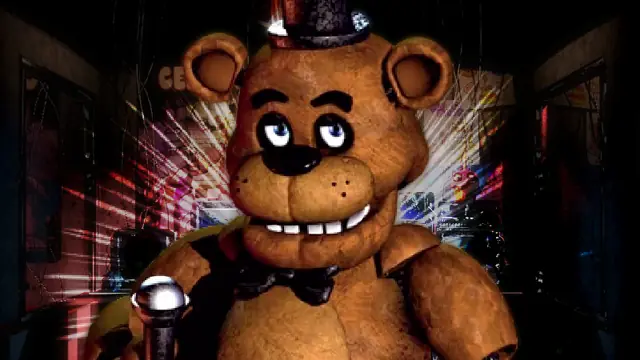
Five Nights at Freddy's is a point-and-click survival horror game where you work the 12 AM to 6 AM security shift at Freddy Fazbear's Pizza, conserving a limited battery while keeping four roaming animatronics out of your office.
| Original Title | Five Nights at Freddy's |
|---|---|
| Original Creator | Scott Cawthon |
| Original Release Date | August 8, 2014 (Desura) / August 18, 2014 (Steam) |
| Playhop Developer | truelisgames |
| Browser Version | Unofficial fan-made version on Playhop |
| Genre | Point-and-click survival horror |
| Nights | 5 main nights, Night 6, and Custom Night (Night 7) |
| Setting | Freddy Fazbear's Pizza security office |
| Controls | Mouse click (PC) or tap (Mobile) |
About
Five Nights at Freddy’s is the 2014 survival horror game by Scott Cawthon that launched the entire FNAF franchise. You play as Mike Schmidt, a newly hired night security guard watching over Freddy Fazbear’s Pizza from midnight until 6 AM. During the day, the restaurant’s animal mascots entertain families, but at night their motors stay active in free-roaming mode, and they treat any human in the building as an endoskeleton outside its costume.
Trapped in a cramped security office with two heavy steel doors, two hallway lights, and a wall of grainy security cameras, you cannot run or fight back. Every action draws from a single finite power reserve. That tension between gathering information and conserving electricity defined modern mascot horror and still makes the original game one of the most replayable survival challenges online.
How to Play
Your goal on every night is to survive from 12 AM to 6 AM before your power gauge hits 0%. You sit in the center of the office and pan your view left or right to reach the doorway controls, while hovering over the bottom bar flips up the security camera tablet.
Each tool increases your power usage bar in the bottom-left corner:
- Base power (1 bar): Always active while the office has electricity.
- Camera monitor: Uses extra power whenever the tablet is open.
- Hallway lights: Press the light buttons beside either doorway to check the immediate blind spots for Bonnie (left) or Chica (right).
- Security doors: Close the left or right door when an animatronic is standing right outside. Keeping both doors shut drains your battery rapidly, so open them again as soon as the threat leaves.
Each night escalates animatronic speed and aggressiveness. Clearing the first five nights unlocks a harder Night 6, and beating Night 6 opens the Custom Night menu where you can set each mascot’s AI level from 0 to 20.
Controls
Five Nights at Freddy’s uses simple point-and-click controls designed around fast mouse movement or touchscreen taps.
| Action | PC Controls | Mobile / Touch |
|---|---|---|
| Look left / right in office | Move mouse to left or right edge | Swipe or tap left / right side |
| Toggle left / right door | Click red Door button | Tap red Door button |
| Toggle left / right hallway light | Click white Light button | Tap white Light button |
| Open / close camera monitor | Hover over bottom arrow bar | Tap bottom arrow bar |
| Switch camera feeds | Click camera number (Cam 1A to Cam 7) | Tap camera number on map |
| Honk Freddy’s nose (poster easter egg) | Click Freddy’s nose on Celebrate poster | Tap poster nose |
Tips to Survive
Night 1 and Night 2
Use Night 1 to learn the camera layout and listen to the Phone Guy’s recording. Bonnie and Chica become active first, while Foxy rarely moves until Night 2. Do not leave doors closed “just in case.” Instead, flash the left light, flash the right light, briefly check Pirate Cove (Cam 1C), and repeat.
Night 3 and Night 4
Freddy Fazbear starts moving off the Show Stage on Night 3, announcing each step with a deep laugh. Unlike Bonnie and Chica, Freddy does not appear in the right hallway light blind spot. Track him on cameras, especially East Hall Corner (Cam 4B). Whenever you open the camera monitor on later nights while Freddy is at Cam 4B, shut the right door first so he cannot slip inside.
Night 5 and Beyond
Adopt a tight, rhythmic loop to preserve power:
- Check the left hallway light for Bonnie.
- Check the right hallway light for Chica.
- Close the right door if Freddy is at Cam 4B, then flip the camera monitor up and down briefly to stall Foxy in Pirate Cove.
- Never keep the camera open for more than a second or two at a time.
Checking any camera stalls Foxy’s movement timer, so you do not need to click away from Cam 4B constantly once Freddy reaches the corner. Just check Cam 1C occasionally to make sure Foxy has not left his curtain. If you hear banging on the left door, Foxy has hit the barrier and drained a small chunk of power, after which he resets to Pirate Cove.
Characters
Five Nights at Freddy’s features five iconic animatronics, each with a distinct movement pattern:
- Freddy Fazbear: The brown bear lead singer who stays on the Show Stage during early nights. Starting on Night 3, he moves through the shadows along the right side of the building toward East Hall Corner (Cam 4B) and waits for you to open your monitor with the right door unsealed.
- Bonnie: The purple-blue rabbit guitarist and usually the first animatronic to leave the stage. He roams the left side of the restaurant, appears in the left doorway blind spot, and can disable your left door and light buttons if he sneaks in while the monitor is up.
- Chica: The yellow chicken who holds Mr. Cupcake. She patrols the right side, makes rattling noises in the Kitchen (audio only on Cam 6), and peers through the right office window before entering.
- Foxy: The tattered pirate fox hidden behind the curtains of Pirate Cove (Cam 1C). Ignoring the camera monitor lets him advance through four stages until he sprints down West Hall (Cam 2A) toward your left door.
- Golden Freddy: A rare, slumped yellow bear apparition linked to the Cam 2B poster. Pulling your camera monitor back up immediately clears him from the office.
Is This the Official Game?
No. The version playable on FNAF Nights is an unofficial fan-made version on Playhop, and it is not affiliated with or endorsed by Scott Cawthon or Steel Wool Studios. Browser builds can differ slightly from the desktop original in audio timing, save storage, or mobile touch scaling.
To support the creator and experience the official build with full achievements and reliable local saves, you can purchase Five Nights at Freddy’s on Steam (PC), the Apple App Store (iOS), Google Play (Android), PlayStation, Xbox, and Nintendo Switch.
Similar Games
If you enjoy the classic office defense loop of Five Nights at Freddy’s, try these related titles next:
- Five Nights at Freddy’s 2: Removes the security doors and adds the Freddy mask, flashlight, and Prize Corner music box.
- Five Nights at Candy’s: Emil Macko’s acclaimed fan game that builds directly on FNAF 1 with three doors and night vision cameras.
- Ultimate Custom Night: Combines 50 animatronics from across the franchise into one customizable high-speed office challenge.
How long does one night last in Five Nights at Freddy's?
A full shift from 12 AM to 6 AM lasts roughly 8 minutes and 55 seconds in the original PC release, with each in-game hour taking about 89 seconds. Surviving until 6 AM without losing power or letting an animatronic inside completes the night and unlocks the next shift.
What happens when your power hits 0% in FNAF 1?
When your power reaches 0%, all lights, cameras, and security doors shut off immediately. Freddy Fazbear appears in the left doorway with glowing eyes and plays his Toreador March jingle before attacking. If the clock hits 6 AM during the jingle, you still survive the night.
Which door does each animatronic use in Five Nights at Freddy's?
Bonnie and Foxy always approach from the left hallway and left office door. Chica and Freddy Fazbear always approach from the right hallway and right office door. Knowing these fixed lanes lets you check blind spots quickly without wasting battery on unnecessary camera flips.
How do you stop Foxy from attacking in FNAF 1?
Check your security monitor regularly to slow Foxy's progress inside Pirate Cove (Cam 1C). If Pirate Cove shows empty curtains, immediately pull down the monitor and shut the left door before checking West Hall (Cam 2A), where Foxy sprints toward your office and bangs on the door.
How do you avoid Golden Freddy in Five Nights at Freddy's?
Golden Freddy is a rare hallucination triggered when the poster in West Hall Corner (Cam 2B) changes to a close-up of a yellow bear. If he slumps inside your office after you lower the monitor, immediately pull the camera monitor back up to dismiss him before he crashes your shift.
Is this browser version of Five Nights at Freddy's official?
No. This is an unofficial fan-made browser version on Playhop and is not affiliated with Scott Cawthon or Steel Wool Studios. The official release is available to purchase on Steam, iOS, Android, PlayStation, Xbox, and Nintendo Switch.
Camera feeds
Related Games
- CAM 01REC01:58 AM
 CAM 02REC02:58 AM
 CAM 03REC02:30 AM